Ecommerce fashion photography is the visual engine that drives online clothing and apparel sales. In an environment where shoppers can’t touch fabrics or try on garments, high-quality images become the primary decision-making tool. A 2023 Shopify study found that product pages with professional photography convert up to 30% better, while Baymard Institute reports that 56% of users consider product imagery a critical factor in purchase confidence.
Done well, ecommerce fashion photography doesn’t just showcase the clothes; it communicates fit, fabric, and lifestyle value at a glance, helping brands on platforms like Shopify, WooCommerce, BigCommerce, and Amazon stand out in crowded product feeds.
Planning an Ecommerce Fashion Photography Strategy
Strategic planning is the foundation of effective ecommerce fashion photography that scales with your product catalogue and brand growth.
Define goals, audience, and platforms
Start by clarifying the core goal of your ecommerce fashion photography: higher conversions, fewer returns, or stronger brand recognition. For example, improving image clarity and consistency can reduce apparel returns by 10–25%, according to internal benchmarking by several large fashion retailers. Identify where your images will appear—your own site, Amazon, Zalando, ASOS Marketplace, or social platforms like Instagram and TikTok Shop—since each has different aspect ratio and file size requirements.
Create a visual style guide
A robust visual style guide keeps ecommerce fashion photography consistent as your team and product range grow. Document background colours, lighting direction, contrast levels, framing, and retouching standards. Include examples of acceptable and unacceptable images. Standards such as Adobe RGB or sRGB color spaces and guidelines from Google Merchant Center are useful references when defining technical specs.
Plan your shot list and workflow
Build a detailed shot list that outlines the required views for each garment: front, back, side, 3/4 angle, close-ups of fabric, and detail shots of closures or branding. Many apparel brands find that offering at least 4–6 images per product can increase add-to-cart rates by 20%. Plan your studio schedule, model bookings, styling notes, and post-production timelines so you can shoot efficiently and maintain consistent output week after week.

Building a High-Converting Fashion Ecommerce Studio Setup
A well-designed studio setup is the backbone of reliable ecommerce fashion photography that produces repeatable, on-brand results.
Lighting for clarity and consistency
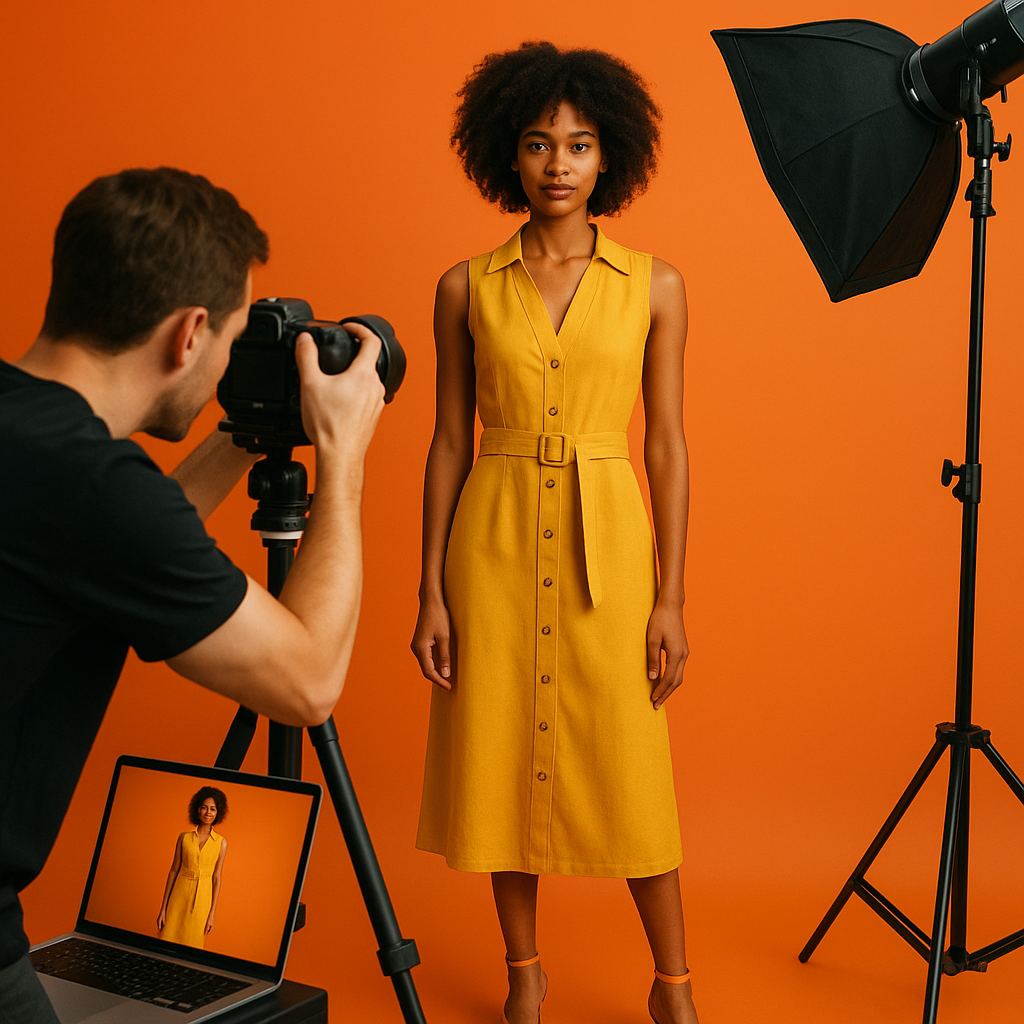
Consistent lighting ensures accurate color and texture representation, which is critical for reducing returns due to expectations mismatch. Use a three-point lighting setup—key light, fill light, and backlight—with softboxes or large diffusers to minimise harsh shadows. Many studios rely on continuous LED systems from brands like Godox or Aputure to maintain constant output and colour temperature around 5000–5600K. Measure your setup with a light meter to keep exposure within ±0.3 stops across sessions.
Backgrounds and sets for ecommerce fashion photography
Clean, distraction-free backgrounds help shoppers focus on the clothing. For pure ecommerce fashion photography, white or light grey seamless paper is standard and aligns with marketplaces like Amazon and eBay. Lifestyle shots can incorporate minimal sets, furniture, or location elements, but keep them secondary to the garment. Ensure your background choice supports fast cutouts and easy reuse for marketing campaigns in tools like Adobe Photoshop and Canva.
Cameras, lenses, and technical settings
Modern mirrorless cameras from Sony, Canon, or Nikon with at least 24MP sensors deliver more than enough resolution for ecommerce. Pair them with sharp 50mm or 85mm prime lenses to minimise distortion. Shoot at ISO 100–400, aperture f/5.6–f/8, and shutter speed above 1/160s to freeze motion while keeping garments crisp. Capture RAW files and convert to sRGB in post to ensure web compatibility and consistent colour across devices.
Model Photography vs Ghost Mannequin for Online Fashion
Choosing between models and ghost mannequins is a key ecommerce fashion photography decision that shapes how customers perceive your brand and products.
Advantages of model-based fashion photography
Model photography helps shoppers understand fit, proportion, and movement. Brands using model imagery often see session durations increase by 15–25%, as customers view more images and explore related products. Models also enable cross-selling through styled outfits and lookbook photography, which you can reuse for email campaigns, social content, and paid ads on platforms like Meta Ads and Google Ads.
Benefits of ghost mannequin and flat lay
Ghost mannequin photography creates a 3D, hollow-body effect that keeps attention solely on the garment’s structure. This approach is efficient for large catalogues and appeals to marketplaces requiring neutral imagery. Flat lay photography, often shot from above on a table, is ideal for knitwear, accessories, and basics. Combined with automation tools like Pixelz or Remove.bg, ghost mannequin workflows can reduce post-production time by up to 40%.
Combining approaches for maximum impact
Many successful ecommerce brands mix model, ghost mannequin, and flat lay imagery. A common strategy is to lead with a model shot for emotional impact, follow with a ghost mannequin for structure, and finish with detail and fabric close-ups. This blend supports both brand storytelling and objective product evaluation, improving confidence for first-time buyers.

Post-Production, Color Accuracy, and Optimisation
Disciplined post-production is essential for ecommerce fashion photography, ensuring that images are accurate, fast-loading, and aligned with platform requirements.
Colour management and accuracy
Accurate colour is vital for apparel where fabric tone and saturation drive purchase decisions. Use tools like X-Rite ColorChecker during shoots and calibrate monitors with hardware calibrators. Maintain a consistent sRGB workflow for web, and document tolerance ranges—for example, delta E < 2—for acceptable colour variance. According to Adobe, colour-managed workflows can reduce colour-related complaints and returns by up to 15%.
Retouching standards and workflow
Establish clear retouching standards: skin smoothing, crease reduction, lint removal, and shape refinement should enhance realism, not distort fit. Use non-destructive editing in Adobe Photoshop and batch adjustments in Adobe Lightroom to standardise exposure and contrast. For large catalogues, consider outsourcing editing to specialised studios that follow ISO 12646 (display) and ISO 3664 (viewing conditions) standards for visual consistency.
File formats, SEO, and performance
Export images in optimised JPEG or WebP formats with file sizes typically under 300KB for product listing pages. Name files descriptively (e.g., “women-black-linen-blazer-front.jpg”) and add keyword-rich alt text to support image SEO and accessibility. On platforms like Shopify or WooCommerce, use CDNs and lazy loading to keep Core Web Vitals in check; Google data shows that reducing page load time from 3s to 1s can increase conversion rates by up to 20%.
Conclusion: Turn Ecommerce Fashion Photography into a Revenue Driver
Consistent, well-planned ecommerce fashion photography transforms product pages from static catalogues into persuasive, revenue-generating experiences. By investing in a reliable studio setup, clear style guides, disciplined post-production, and a mix of model, ghost mannequin, and detail imagery, you create visual content that builds trust and reduces friction in the buying journey.
Audit your current imagery, define a repeatable workflow, and pilot improvements on a key product category. Then track metrics such as conversion rate, time on page, and return rate to quantify impact. If you lack in-house resources, partner with a specialised fashion ecommerce studio or consultant to design a scalable system that aligns with your brand and platform requirements.
Frequently Asked Questions
What is ecommerce fashion photography?
Ecommerce fashion photography is the practice of shooting clothing and accessories specifically for online stores, marketplaces, and digital campaigns. It focuses on clarity, accurate colour, consistent styling, and conversion-focused presentation so customers can evaluate fit, fabric, and details without seeing the product in person.
How many images should each fashion product have?
Most apparel products perform best with 4–8 images per listing, including front, back, side, and 3/4 views, plus detail and fabric close-ups. If you use models, include at least one full-length shot and one cropped shot to show styling and fit. More complex garments or premium items may benefit from up to 10 images to fully demonstrate features.
Do I need models for ecommerce fashion photography?
Models are highly recommended but not strictly required. They help customers understand fit and proportion, which can increase purchase confidence and cross-selling opportunities. However, if budgets are limited, you can start with ghost mannequin and flat lay photography, then add model shoots for key categories or campaign launches as resources allow.
What equipment do I need to start?
To start with ecommerce fashion photography, you’ll need a reliable mirrorless or DSLR camera, a 50mm or 85mm lens, two to three continuous lights with softboxes, a seamless backdrop, and basic stands and clamps. Over time, you can add reflectors, additional lenses, a color checker, and calibrated monitors to improve consistency and accuracy.